

Selecting several parts
- Select one part.
- Hold Shift and click another part in the 3D canvas. Both parts fill orange.
- To take a part out of the selection, hold Shift and click it again.
- The path at the bottom of the canvas is hidden.
- The properties panel has the heading Parts and a count, such as 2 parts selected. Each selected part has one line there, with the part’s name, then the object’s name. The line ends with moved or hidden when the part is changed in the active setup.
- Esc selects the object the parts belong to. Press Esc again to select nothing.
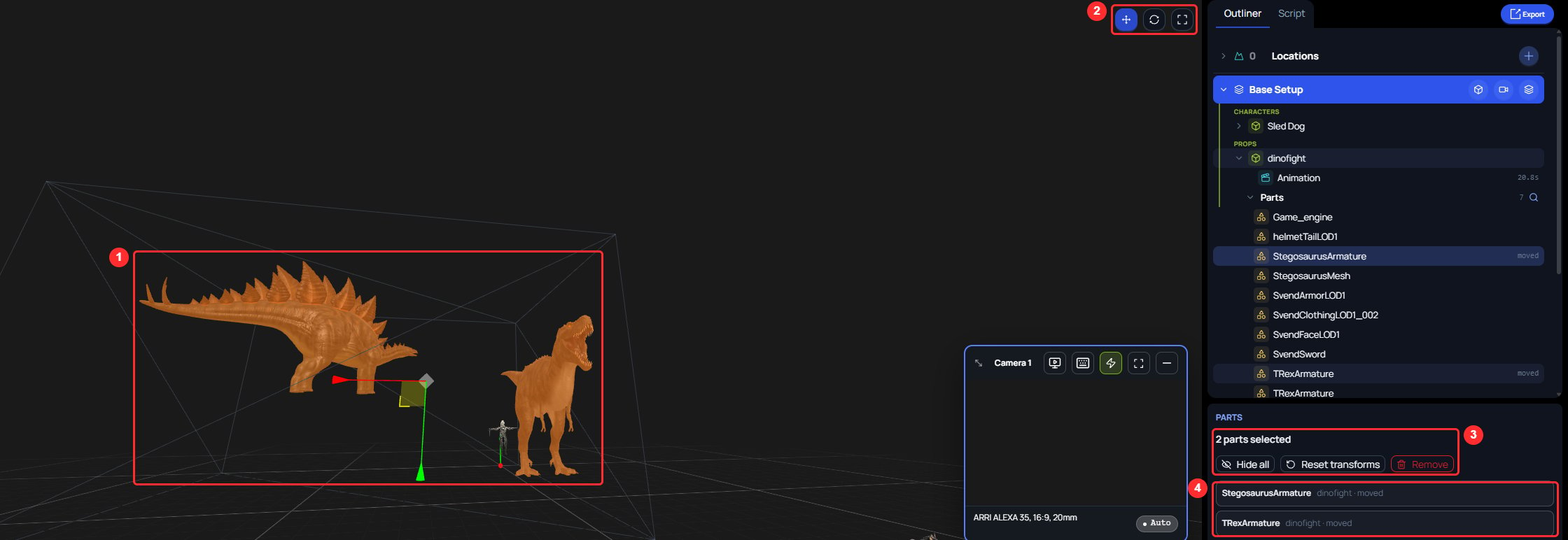
- The two selected parts, filled orange, with one gizmo between them.
- The Move, Rotate, and Scale buttons.
- The count, and the buttons that act on every selected part.
- One line for each selected part.
Changing several parts together
With two or more parts selected, one gizmo sits between them.- Choose Move, Rotate, or Scale with the buttons at the upper right of the 3D canvas.
- Drag the gizmo.
A message says how many parts changed, such as 2 parts moved. The parts stay selected after the drag. One Ctrl+Z undoes the whole drag for every part.
The properties panel has three buttons for the selected parts:
- Hide all hides every selected part. The button then reads Show all.
- Reset transforms puts every selected part back where the file has it. The button is greyed out when no selected part is moved.
- Remove clears every change on the selected parts, without asking you to confirm. The parts’ rows leave the Parts list, and the object becomes selected. Press Ctrl+Z to bring the changes back.
One mesh of a rigged character cannot be transformed by itself, because a skeleton drives its shape. The gizmo does not appear. The path at the bottom of the canvas reads Follows a skeleton — can’t be moved, with a Select button that names the nearest level you can transform, such as Select Game_engine. Click that button, then transform that level.When such a mesh is selected together with other parts, a message says it follows a skeleton and won’t move with the others. The gizmo then changes only the other parts.