

Creating a new production
From your organization page, select New Production and enter a name. Productions act as containers for scripts, scenes, and the Gallery.
Choosing who can open a production
Each production has an Access setting. You choose it when you create the production, and you can change it later: on the organization page, open the … menu on the production’s card and click Settings.- Everyone in the organization — Every member can open the production.
- Only selected people — Admins can open it, plus the members you tick.
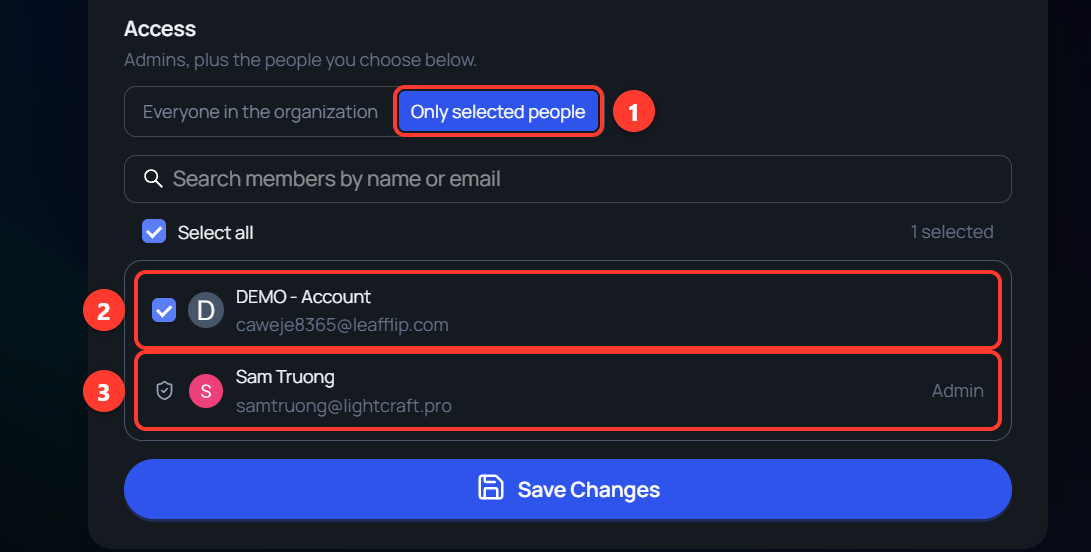
- Only selected people shows the list of members.
- A ticked member can open this production.
- An Admin has no checkbox, because admins can open every production.
Production dashboard overview
The production dashboard displays all productions in your organization. You can switch between grid and list views and sort by name or date.Navigating scripts and scenes
Within a production, use the sidebar to move between:- Scripts — Open the script editor to write or review screenplays.
- Scenes — Access the scene editor for any scene generated from script headings.